
Your shopping cart is empty!
Categories
- 3D Printing and Plastic peripherals (8)
- 433Mhz and Lora (8)
- Support (2)
-
Amateur Radio (668)
- - Antenna Analyzer (12)
- - APRS (12)
- - ATU (5)
- - CW (1)
- - Digital Modes (9)
- - DMR (4)
- - Echolink (10)
- - Enclosure (14)
- - Eshail-2 (QO-100) (67)
- - GPS (9)
- - iGate (1)
- - Microcontrollers (43)
- - Microphone (1)
- - Power Supply (7)
- - Programming Cable (6)
- - QRP (9)
- - Radio interface (26)
- - Receiver (11)
- - Repeater (4)
- - RF Amplifiers (20)
- - RF Kits (20)
- - RF modules (118)
- - Rotator (1)
- - SDR (78)
- - Spectrum Analyzer (4)
- - SWR (9)
- - Transceiver (60)
- - WSPR (5)
- Antennas and Acc (322)
- Audio and Video (28)
- Aviation (6)
- Bargain Box (1)
- Battery (3)
- Bluetooth (11)
- Cables (37)
- Computer Peripherals (105)
- Connectors (93)
- Data acquisition (1)
- Display (2)
- Electromechanical (26)
- Enclosure (13)
- GPS (7)
- Hardware (4)
- Home Automation (128)
- Inverter (9)
- Liquid (7)
- Lora (8)
- Microcontrollers (121)
- Modbus (3)
- MQTT (14)
- Network Radio (3)
- Networking (9)
- Power (135)
- Power supply (49)
- Radio Interface (21)
- RF Modules (144)
- ROIP (7)
- Satellite (95)
- Security (13)
- Sensor (17)
- Solar (14)
- Test and Measurements (66)
- Tools and Equipment (8)
- Tracking (4)
- VOIP (15)
- Weather (1)
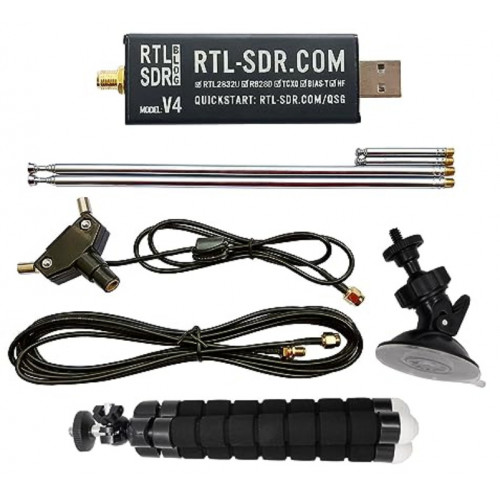
RTL-SDR Blog V4L R828S 500 kHz and 1.75 GHz . 1PPM TCXO SMA Software Defined Radio with Dipole Antenna Kit.
Product Code: SDRRTLV4LHFANTKIT
Availability: 47
Availability: 47
Price: R1,162.68
Ex Tax: R1,011.03
Ex Tax: R1,011.03
Qty:
- OR -
Add to Wish List
Add to Compare
Add to Compare

RTL-SDR Blog V4L (Lite) USB SDR Receiver with Multipurpose Dipole Antenna Kit
Wideband software-defined radio receiver | 500 kHz–1.766 GHz | R828S tuner | 1 PPM TCXO | Windows & Linux
See section in G14 in this document http://www.zs6wr.co.za/live/wp-content/uploads/2010/10/RadioRegs-Act-No.-103-of-1996-Amentment-2005-2007-1.pdf Section G14 Radio receiving apparatus with continuous tuning (1) No person shall use or have in his possession any radio receiving apparatus with continuous tuning that can be tuned to bands above 30 MHz other than the international broadcasting and amateur bands except where the Postmaster General's prior approval was obtained.
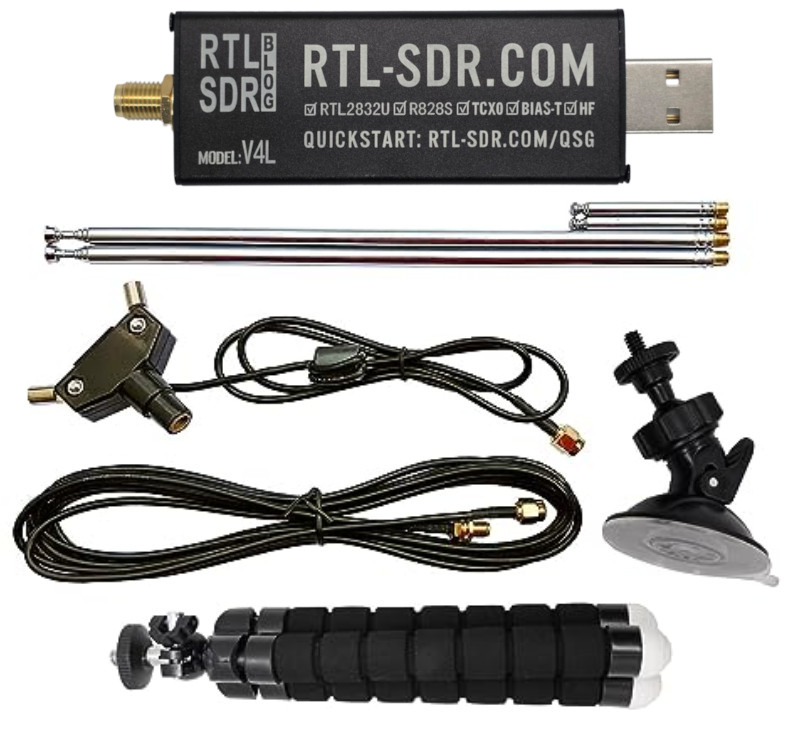
Explore radio signals using your Windows or Linux computer with the RTL-SDR Blog V4L. This compact USB software-defined radio (SDR) receiver comes with a portable adjustable dipole antenna kit for getting started with FM broadcast, amateur radio, airband, marine radio, ADS-B aircraft signals, shortwave listening and more (subject to local regulations, antenna suitability and available signals).
Important: The V4L is not the older RTL-SDR V4. It uses the R828S tuner and needs V4L-compatible RTL-SDR software drivers. Older installations may detect the dongle but receive no signals. This product is a receiver only; it cannot transmit.
Key features
- Receive approximately 500 kHz to 1.766 GHz with a suitable antenna and software.
- Rafael Micro R828S tuner and RTL2832U 8-bit USB SDR chipset.
- Integrated HF upconverter: no direct-sampling selection is needed to tune HF.
- 1 PPM temperature-compensated oscillator (TCXO) for improved frequency stability.
- Typically 2.56 MSPS stable sample rate; higher rates may drop samples.
- SMA female RF antenna connector, USB-A interface and aluminium case.
- Software-controlled 4.5 V bias tee, up to 180 mA, for compatible powered RF accessories only.
What is included in the antenna package?
| Item | Quantity / description |
|---|---|
| RTL-SDR Blog V4L USB dongle | 1 × receiver with SMA female RF input |
| Dipole antenna base | 1 × base with approximately 60 cm RG174 cable and SMA male connector |
| Long telescopic elements | 2 × adjustable approximately 23 cm–1 m |
| Short telescopic elements | 2 × adjustable approximately 5–13 cm |
| Coax extension cable | 1 × approximately 3 m RG174 extension |
| Flexible tripod | 1 × bendable mounting tripod |
| Suction-cup mount | 1 × adjustable window/smooth-surface mount |
1. Assemble and position the dipole antenna
- Select the pair of long elements for typical VHF reception, or the short elements for higher UHF frequencies.
- Carefully screw both matching telescopic elements into the two threaded antenna-base sockets. Do not overtighten.
- Attach the dipole base to either the flexible tripod or the suction-cup mount using its standard camera-style mounting thread.
- For most local terrestrial VHF/UHF signals, start with the two elements arranged vertically (one up, one down). For some satellite reception, a V-shaped dipole can work better.
- Extend each antenna element to approximately the same length, chosen for your receiving frequency. A useful starting estimate is element length (metres) ≈ 71.5 ÷ frequency (MHz); this is an approximation for each arm of a half-wave dipole and is limited by the antenna's physical length.
- Use the 3 m extension cable if needed to move the antenna closer to a window or higher up. Keep the dongle connected to the computer and avoid stressing its USB port.
- Connect the antenna cable's SMA male plug to the dongle's SMA female socket finger-tight, then connect the dongle to a USB port.
Antenna starting lengths (each arm):
FM broadcast ~100 MHz: ~71 cm (long elements) | Airband ~125 MHz: ~57 cm (long elements)
Amateur 145 MHz: ~49 cm (long elements) | Marine ~156 MHz: ~46 cm (long elements)
433 MHz: ~16.5 cm (short rods may not reach; use the longer rods at a suitable setting) | 1090 MHz ADS-B: ~6.6 cm (short elements).
Lengths are practical starting points, not guaranteed resonant measurements. For HF/shortwave, this compact dipole is generally inefficient; a suitable dedicated HF antenna will perform better.
Antenna safety: The included mounts and antennas are for temporary outdoor use in good weather, not permanent outdoor installation. Keep clear of power lines and lightning. Never use the equipment outdoors during thunderstorms. Secure the suction cup and tripod to prevent falling.
2. Windows 10 / Windows 11 installation
- Connect the receiver to a USB port and allow Windows to finish detecting the USB device.
- Download Zadig from zadig.akeo.ie. Run it as administrator.
- In Zadig select Options → List All Devices. Choose the dongle's interface, usually Bulk-In, Interface (Interface 0) or the appropriate RTL2832U device. Verify the device carefully so you do not replace a keyboard, mouse or other USB device's driver.
- On the driver selection side choose WinUSB, then click Install Driver or Replace Driver. Do not change Interface 1 if the SDR guide specifies Interface 0.
- Download SDR++ from sdrpp.org and extract the Windows release to a folder.
- Critical V4L step: Download the latest Releases.zip from the RTL-SDR Blog V4L-compatible driver releases. Extract it and copy rtlsdr.dll from the x64 folder into your SDR++ program folder, replacing its existing DLL after backing it up. Some installations may also need associated runtime DLLs included in the release.
- Start SDR++, choose RTL-SDR in the Source panel, select your receiver, use about 2.4 MSPS as a starting sample rate, and press Play.
- Set a sensible RF gain, choose WFM for FM broadcast or NFM for narrowband voice, and tune to a known local signal.
Using SDR# instead? Download the latest SDR# package from Airspy; run its current install-rtlsdr.bat if provided, as instructed by the V4L guide. SDR# is typically a 32-bit application, so when manually replacing its driver use the x86, not x64, rtlsdr.dll. Select RTL-SDR USB as the source and start receiving.
Driver distinction: Zadig installs the Windows USB WinUSB driver. The V4L-compatible rtlsdr.dll is a separate application-level driver/library. For software that does not already ship with V4L support, both steps are required.
3. Ubuntu / Debian Linux / Raspberry Pi OS installation
For a fresh installation, use an up-to-date RTL-SDR driver build that supports the V4L. The manufacturer's Linux instructions use the current Osmocom RTL-SDR source. If an old RTL-SDR driver is installed, uninstall conflicting packages first and check that your system is not loading an outdated library from another location.
Install prerequisites:
sudo apt update
sudo apt install -y git cmake build-essential pkg-config libusb-1.0-0-dev
Build and install an updated RTL-SDR library:
git clone https://github.com/osmocom/rtl-sdr.git
cd rtl-sdr
mkdir build && cd build
cmake .. -DINSTALL_UDEV_RULES=ON
make -j"$(nproc)"
sudo make install
sudo cp ../rtl-sdr.rules /etc/udev/rules.d/
sudo ldconfig
Prevent the Linux DVB-T TV driver from claiming the USB dongle:
echo 'blacklist dvb_usb_rtl28xxu' | sudo tee /etc/modprobe.d/blacklist-dvb_usb_rtl28xxu.conf
sudo reboot
Test the receiver after reboot:
rtl_test -t
A successful test should find the RTL-SDR device and report its supported tuner/configuration. Stop any other SDR program before running rtl_test. If the old distro driver still takes precedence, consult the manufacturer's V4L Linux instructions for the package purge/removal steps; these affect existing installations, so review them before executing.
For a graphical receiver, install a current build of SDR++ or another Linux SDR application that can use your updated system librtlsdr. Select an RTL-SDR source, verify it opens, and tune to a strong local station. Some SDR application packages bundle their own libraries and may require an application update.
4. First reception: suggested tests
| Signal | Typical frequency / mode | Antenna tip |
|---|---|---|
| FM radio | 88–108 MHz / WFM | Long dipole elements, ~70–80 cm each |
| Airband voice | 118–137 MHz / AM | Long elements, near a clear window |
| Amateur 2 m | 144–146 MHz (regional allocations vary) / NFM or SSB | ~49 cm each element |
| Aircraft ADS-B | 1090 MHz / ADS-B decoder | Short elements ~6–7 cm each, high unobstructed position |
| HF / shortwave | Approx. 0.5–30 MHz / AM, USB, LSB, CW | Dedicated HF antenna recommended |
HF operating note: The V4L's internal HF upconverter is handled by compatible drivers. Enter the actual desired HF frequency in your SDR application; do not enable direct sampling or manually add the upconverter oscillator offset for the standard V4L driver configuration.
5. Bias tee (powered accessories only)
The V4L can provide 4.5 V DC, up to 180 mA on the SMA connector to power compatible low-noise amplifiers or active antennas. Leave bias tee OFF for the supplied passive dipole kit. Do not enable it on an antenna/feedline that is DC shorted directly to ground. On supported Windows applications with RTL-SDR Blog drivers, the Offset Tuning option may control the bias tee; consult the official V4L guide for the exact software behaviour. With the corresponding command-line utility, use rtl_biast -b 1 to enable or rtl_biast -b 0 to disable, with all SDR applications closed.
6. Troubleshooting
| Problem | What to check |
|---|---|
| Device detected, but no signals | Confirm you installed a V4L-compatible rtlsdr.dll / librtlsdr; check antenna and gain. |
| Windows application cannot open device | Check Zadig installed WinUSB on the correct RTL-SDR interface. Close other SDR programs and retry. |
| Linux permission / busy error | Verify udev rules, reconnect USB, blacklist DVB-T driver, check for other applications using the device. |
| Weak or noisy reception | Move antenna higher/near window, adjust lengths/polarisation, lower excessive gain, avoid PC/USB interference. |
| HF band seems silent | Use a more suitable HF antenna and confirm V4L driver. Do not enable direct sampling. |
| Audio distorted / too many signals | Reduce gain; consider band-pass or notch filtering near powerful local transmitters. |
Official downloads, instructions and manuals
- RTL-SDR Blog V4L manufacturer's users guide — latest V4L compatibility and driver details.
- RTL-SDR quick-start guide — Windows Zadig, SDR# and SDR++ procedures.
- RTL-SDR Blog Windows driver downloads — V4L-compatible DLLs.
- Zadig USB driver installer — WinUSB driver installation for Windows.
- SDR++ software — graphical SDR receiver.
- Manufacturer dipole antenna guide — mounting, adjustment, polarisation and examples.
- RTL-SDR V4L Manual --- Manual that comes with Dongle
Giga Technology – Getting started tip: Start with a strong local FM broadcast station to verify the dongle and software before experimenting with aircraft, marine, amateur radio or satellite signals. Use the included tripod or suction mount to place the antenna where reception is strongest.
Specifications and compatibility are based on manufacturer documentation; software interfaces and driver packaging can change. Reception depends on location, antenna placement and legal restrictions. All external links open the relevant official site.
RTL-SDR V4L Manual
Write a review
Your Name:Your Review: Note: HTML is not translated!
Rating: Bad Good
Enter the code in the box below:
Powered By OpenCart
Giga Technology © 2026
Giga Technology © 2026