
Your shopping cart is empty!
Categories
- 3D Printing and Plastic peripherals (8)
- 433Mhz and Lora (8)
- Support (2)
-
Amateur Radio (666)
- - Antenna Analyzer (12)
- - APRS (12)
- - ATU (5)
- - CW (1)
- - Digital Modes (9)
- - DMR (4)
- - Echolink (10)
- - Enclosure (14)
- - Eshail-2 (QO-100) (67)
- - GPS (9)
- - iGate (1)
- - Microcontrollers (43)
- - Microphone (1)
- - Power Supply (7)
- - Programming Cable (6)
- - QRP (9)
- - Radio interface (26)
- - Receiver (11)
- - Repeater (4)
- - RF Amplifiers (20)
- - RF Kits (20)
- - RF modules (118)
- - Rotator (1)
- - SDR (77)
- - Spectrum Analyzer (4)
- - SWR (9)
- - Transceiver (60)
- - WSPR (5)
- Antennas and Acc (322)
- Audio and Video (28)
- Aviation (6)
- Bargain Box (1)
- Battery (3)
- Bluetooth (11)
- Cables (37)
- Computer Peripherals (104)
- Connectors (93)
- Data acquisition (1)
- Display (2)
- Electromechanical (26)
- Enclosure (13)
- GPS (7)
- Hardware (4)
- Home Automation (128)
- Inverter (9)
- Liquid (7)
- Lora (8)
- Microcontrollers (121)
- Modbus (3)
- MQTT (14)
- Network Radio (3)
- Networking (9)
- Power (135)
- Power supply (49)
- Radio Interface (21)
- RF Modules (144)
- ROIP (7)
- Satellite (95)
- Security (13)
- Sensor (17)
- Solar (14)
- Test and Measurements (66)
- Tools and Equipment (8)
- Tracking (4)
- VOIP (15)
- Weather (1)
Kiosk Administration Dashboard server (LINUX)
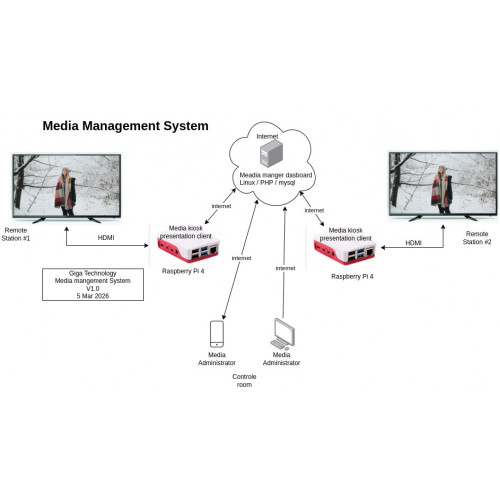
Product Code: KIOSKSERVERLIN
Availability: Out Of Stock
Availability: Out Of Stock
Price: R3,335.00
Ex Tax: R2,900.00
Ex Tax: R2,900.00
Qty:
- OR -
Add to Wish List
Add to Compare
Add to Compare

Kiosk Administration Dashboard server (LINUX)
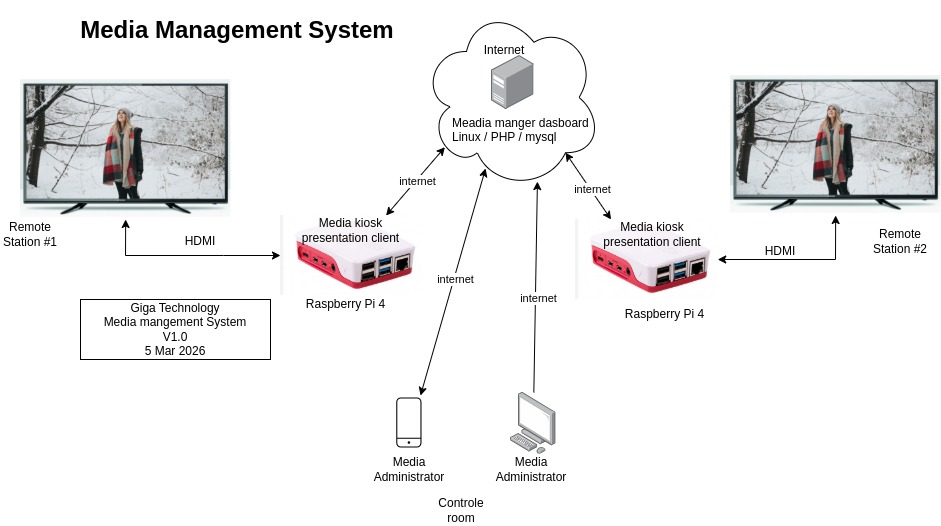
System Overview
Each TV screen at a client location is connected to a Raspberry Pi device. The Raspberry Pi loads a webpage from a central web server in full-screen kiosk mode. The web server dynamically generates the media content for each specific site.
Main Components:
-
TV Screen
-
Raspberry Pi (connected via HDMI)
-
Internet Connection
-
Central Web Server (PHP + MySQL)
-
Admin Dashboard
2. How It Works (Step-by-Step)
-
The Raspberry Pi powers on.
-
It automatically launches a browser in kiosk mode.
-
The browser loads a URL specific to that location (e.g., display.php?site=SITE001).
-
The server reads the site ID and retrieves that site's playlist from the database.
-
The server dynamically builds an HTML page with images/videos.
-
The browser displays the content in full screen.
-
The page automatically refreshes periodically to check for updates.
3. Admin Dashboard
The system includes an Admin Dashboard where administrators can:
-
Create and manage site locations
-
Upload images and videos
-
Create playlists per site
-
Reorder media items
-
Set display duration for each item
-
Monitor screen online/offline status
4. Example Screens
Example 1: Fullscreen Image Display
The screen shows a single image scaled to fit the entire display.
[ FULL SCREEN IMAGE ]
----------------------------------------
| |
| Promotional Banner Image |
| |
----------------------------------------
Example 2: Video Playback
The screen automatically plays a promotional video in full screen.
[ FULL SCREEN VIDEO ]
----------------------------------------
| |
| Promotional Video Playing |
| |
----------------------------------------
Example 3: Mixed Playlist Rotation
The screen rotates between images and videos automatically.
Playlist Order Example:
1. Image - Welcome Banner (10 seconds)
2. Video - Product Demo (30 seconds)
3. Image - Special Offer (15 seconds)
Example 4: Admin Dashboard Screen
[ ADMIN DASHBOARD MOCKUP ]
----------------------------------------
| Sites | Media Library | Playlists |
----------------------------------------
| SITE001 | Edit Playlist | Online |
| SITE002 | Edit Playlist | Offline |
----------------------------------------
5. Benefits of the System
-
Centralized control of all screens
-
No travel required to update content
-
Scalable to many locations
-
Cost-effective hardware
-
Real-time updates
-
Custom content per client
Write a review
Your Name:Your Review: Note: HTML is not translated!
Rating: Bad Good
Enter the code in the box below:
Powered By OpenCart
Giga Technology © 2026
Giga Technology © 2026